

Product
What doc2data can and cannot do yet
Product pages usually list what a product does. This one gives as much space to what doc2data does not do yet, because you need to know that before you send it a single invoice.
What doc2data is
doc2data turns a folder of invoice and receipt PDFs or scans into one Excel, CSV or JSON file, with a list of documents that need a human look. In its default mode it runs offline on your own computer with no per-page API charge. The output format does not guarantee complete or correct extraction; the review list exists for that reason.
Status: demo. Nobody outside Snello has used it, nothing has been delivered to a paying client, and its accuracy on real-world documents has not been measured.
What it attempts to do
Extract: vendor, VAT number, invoice number, date, currency, net amount, VAT, total, and the supported line items (description, quantity, unit price, amount). Layout limits and wrapped rows mean it cannot guarantee every line item.
Read two kinds of input:
- PDFs with an embedded text layer, read directly;
- image-only scans, through OCR (optical character recognition) that runs locally. Phone photos have not been tested.
Rules for four languages: label rules for Italian, English, German and French invoices, tested on synthetic invoices in those languages and 4 currencies (EUR, GBP, CHF, USD). Other layouts and currencies are untested.
Check every document:
- net + VAT = total, and VAT = rate × net (single-rate invoices);
- line items add up, and quantity × unit price = line amount;
- dates are plausible and VAT numbers have a valid format;
- required fields are present.
Flag anything that fails a check on a "Needs review" sheet, with the reason. Gaps are never filled with a guess. Passing every check does not prove every field is right (see silent errors below).
Optional AI fallback, off by default. If you switch on the cloud option, it sends up to the first 6,000 characters of the extracted text to an OpenAI-compatible provider you choose, using your own API key. The optional Ollama fallback runs on the same machine (localhost); nothing leaves the computer. AI-filled fields are flagged. Both options are built and unit-tested with a simulated backend; neither has been tested against a live model.
What we measured
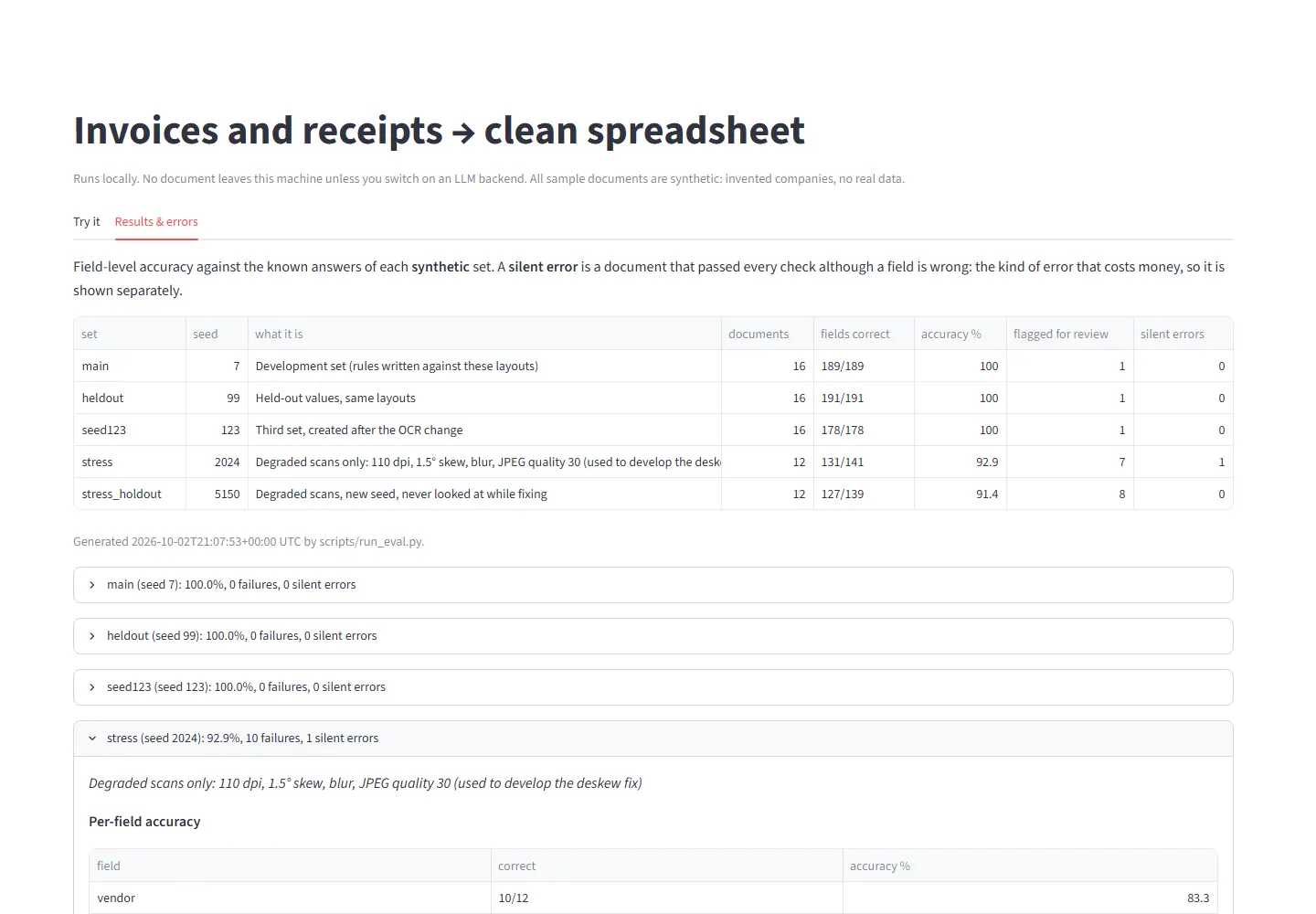
Measured 2 October 2026 in our Docker build (commit e4bfc58), rechecked the same day at revision 708168d with identical results. All documents are synthetic: invented companies, addresses and VAT numbers.
| Test set | What it is | Documents | Field errors |
|---|---|---|---|
| Main | Development set; the rules were written against it | 16 | 0 of 189 fields |
| Held-out values | Same layouts, new values | 16 | 0 of 191 fields |
| Third set | New values; per the developer, measured before (174 of 178) and after the OCR change and not deliberately used to tune it; included in automated tests throughout development | 16 | 0 of 178 fields |
| Degraded scans | 110 dpi, tilted, blurred, compressed; used while developing a fix | 12 | 10 of 141 (131 correct, 92.9%) |
| Degraded scans, hold-out | Same kind of damage; per the developer's log, not looked at during that fix | 12 | 12 of 139 (127 correct, 91.4%) |
- The invoice with a deliberate arithmetic error was flagged in every set.
- Silent errors (a document passed every check but a field is wrong): 0 on the clean sets, 1 on the degraded development set (a vendor name read as "S.n.C." instead of "S.n.c."), 0 on the degraded hold-out set.
- False alarms: on the degraded sets, 6 of 11 and 7 of 11 otherwise valid invoices were also flagged, mostly because a total could not be read.
- The automated test suite passes 21 of 21.
Why those numbers are not a promise
- The synthetic invoices come from 2 layouts plus a receipt format, and the rules were written knowing them. The other sets change values and image quality, not layouts, so none of them tests unseen layouts.
- With 16 or 12 documents per set, zero errors on clean sets shows the pipeline runs end to end; it supports no accuracy bound for real supplier invoices. These small synthetic sets do not establish a reliable difference in general performance; no analysis accounting for document clustering has been performed.
- Performance on real supplier documents has not been measured and may differ, including being lower. Other layouts, multi-page invoices, discounts, phone photos and handwriting are untested.
What it cannot do yet
- Several VAT rates on one invoice: not handled.
- Line-item tables that continue across pages: not handled.
- Credit notes: not handled.
- Line descriptions that wrap onto two lines: not handled reliably.
- VAT number validity: format only, not checksum or the EU's VIES register.
- Single-character errors in names and VAT numbers on poor scans cannot be caught by arithmetic checks.
- Currency inference: an unreadable currency stays empty and the document is flagged; it is never guessed from the VAT country.
- Real-world accuracy: not measured.
A platform note: in the developer's runs on revision e4bfc58, the two degraded sets scored 95.7% and 94.2% on Windows, against the Docker (Linux) figures above. This is environment-specific developer evidence, not a general platform comparison. We report the Docker figures as the reference.
What it is useful for today
- Checking whether your text-based PDF invoices look suitable for automatic processing.
- A feasibility check on 3 of your documents. That is a first look, not a reliable accuracy estimate.
- A starting point for a custom pipeline for your layouts, with checks and a review list.
What would change this page
We will update this article when doc2data handles one of the missing cases, or when accuracy has been measured on real documents with the owner's permission.
Try it on your documents
Send 3 sample documents, with sensitive data removed. Send 3 sample documents
Sources
- doc2data evaluation reports, five synthetic sets with field counts, flags and silent errors, generated 2 October 2026 (commit e4bfc58), rechecked at 708168d; developer log for the hold-out chronology. Published results with denominators and limits: doc2data test evidence.
- doc2data code for the AI fallback (6,000-character prompt limit), reviewed 3 October 2026 (internal).
- Screenshot of the demo's "Results & errors" tab, 3 October 2026, synthetic data (this article's cover image).
- company-engineer fact-check and company-researcher review, 3 October 2026 (internal).
Bring your workflow into focus.
Send up to 3 samples or describe one process. We reply by email with what is feasible and how we would measure it.