

Work

Synthetic data

FatturaPA reader and SdI receipt explainer

Your e-invoices in one clean spreadsheet, with errors flagged, not guessed.

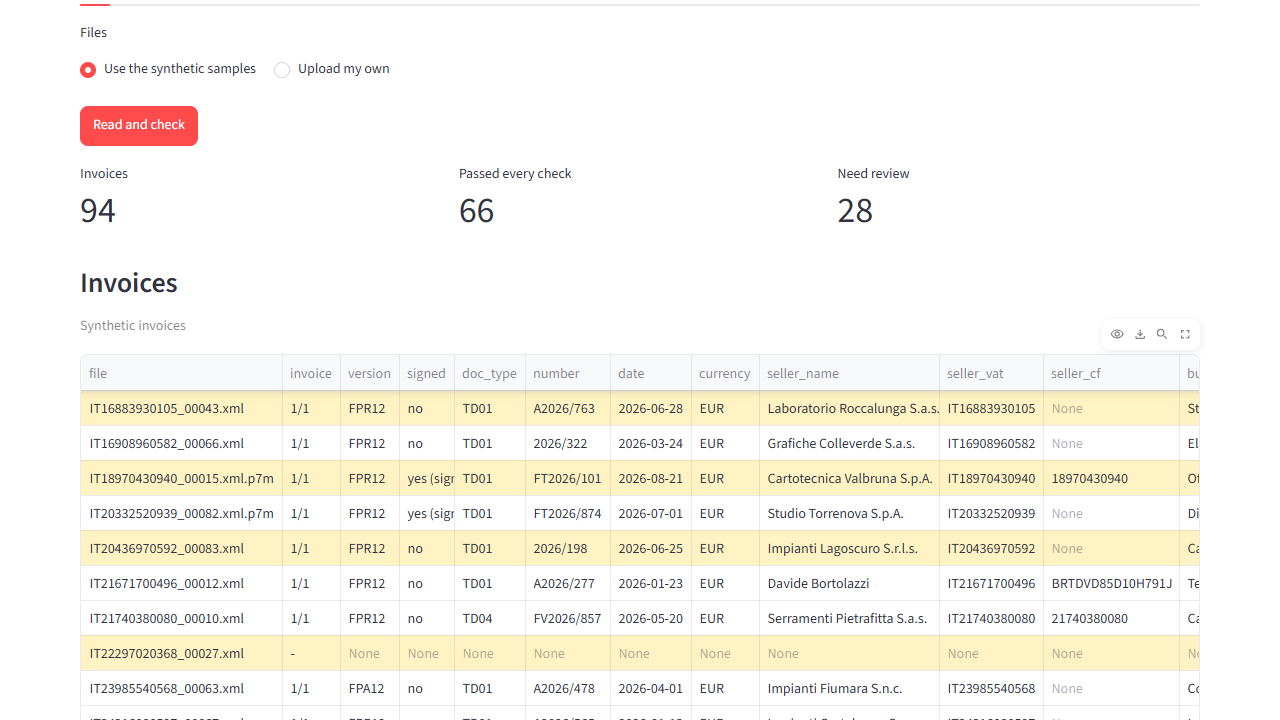
A folder of synthetic e-invoices is loaded; the Invoices table fills in; the Needs review list shows each flagged invoice with its reason and SdI code; a synthetic rejection notice is explained on the SdI receipts tab.

Who it is for

  • Small firms and freelancers who receive many supplier e-invoices.
  • Bookkeeping assistants in small accounting offices.

The challenge

Italian electronic invoices arrive as FatturaPA XML files, exchanged through the tax agency's SdI system (Sistema di Interscambio). A small business can receive a folder of XML files, some wrapped in a signed .p7m, and someone has to copy the totals into a spreadsheet, spot the mistakes, and work out why the SdI rejected an invoice.

What we built

  1. Reads FatturaPA files: .xml, signed .xml.p7m, or a .zip of them. One file may hold several invoices.
  2. Writes one output (Excel, CSV or JSON) with every invoice, line item and VAT summary row: seller and buyer, VAT numbers and tax codes, number, date, taxable amount, VAT, total, withholding tax, split-payment VAT, amount due, due date and IBAN.
  3. Checks every invoice and lists each problem with its reason. Nothing is corrected or guessed:
  • VAT number (partita IVA) and tax code (codice fiscale) check digits;
  • arithmetic of each line, each VAT summary, the document total and the payment after withholding tax and split payment;
  • exemption (Natura) codes, dates, required fields, and duplicates within one batch.

Each problem shows the SdI rejection code it corresponds to, for example [SdI 00423], or says that the SdI does not check it.

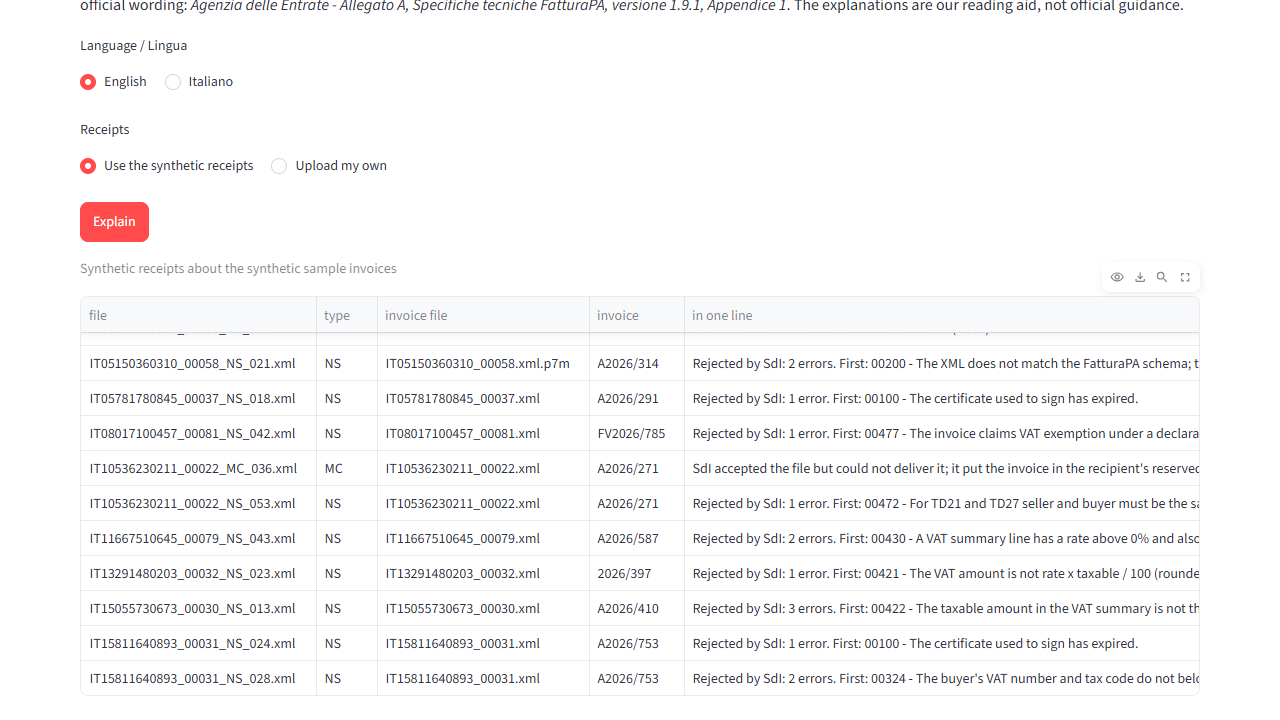
  1. Explains SdI receipts. Drop in the notices the SdI sends back (rejection, delivery, could-not-deliver, or a public administration's outcome) and get a one-line answer in English or Italian, every error code in plain words with a fix hint, and the official Italian text.

Local processing runs on your own computer, with owner access.

Invoices table with seller, VAT number, taxable amount, VAT and total for synthetic e-invoices.
Invoice checks and flagged rows · synthetic data, 5 October 2026.
SdI receipts tab explaining a synthetic rejection notice in plain words, with a fix hint and the official text.
SdI receipts · synthetic data, 5 October 2026.

Results

All invoices are invented by our own generator. Measured 5 October 2026; figures from the project's evaluation reports.

SetWhat it isFiles / invoicesFields read correctlyPlanted faults detectedClean invoices flagged by mistakeSilent errors
DevelopmentThe first set looked at while building88 / 941,530 of 1,53028 of 280 of 660
Hold-outSame scenarios, new values (seed 29); regenerated and re-measured after the final check change on 5 October 2026 (an earlier version also scored 100%); per the developer's record, its results were not used to design the checks88 / 941,536 of 1,53628 of 280 of 660
FormatsUnusual encodings and namespace prefixes, minified, wrapped in a signed .p7m88 / 941,555 of 1,55528 of 280 of 660
  • Planted faults: 13 kinds, each planted in 2 files per set, such as a wrong check digit, wrong arithmetic, a missing invoice number, an impossible date, a truncated file or the same invoice sent twice.
  • A silent error is an invoice that passed every check although a field was read wrongly.
  • Why a perfect score is not the headline: the generator and the reader were written by the same developer, so perfect scores on our own files mostly show the code is internally consistent. Two checks use material we did not write:
  • every generated file meant to be valid passes the official FatturaPA v1.2.2 schema: 80 of 80 in each set;
  • the 6 example files published on fatturapa.gov.it (8 invoices) are all read. All are flagged, correctly: they use a placeholder VAT number whose check digit is wrong.

SdI receipts (synthetic, 60 notices): 60 of 60 read with the right type; 74 of 74 error-code occurrences extracted; all 69 occurrences of known codes explained; the 5 occurrences of codes not in the official table reported as unknown with the SdI's own text, never guessed. The code table comes from the SdI technical specifications, version 1.9.1, which lists 67 distinct codes. The plain-language explanations are ours and are not official guidance.

Technical background

Python, lxml and defusedxml (safe XML parsing), cryptography and asn1crypto (signed .p7m files), pandas, openpyxl, Streamlit; tests with pytest and Playwright; packaged with Docker.

Limits

  • Not measured on real invoices. Files from real accounting software will contain blocks our generator does not produce.
  • The .p7m signature is not verified. The invoice is unwrapped and the output says "signature not verified".
  • Only check digits are verified for VAT numbers and tax codes. There is no lookup in the VIES or Agenzia delle Entrate registers.
  • Not supported yet: withholding on pension-fund contributions, document-level percentage discounts, and the simplified invoice format.
  • Duplicates are found only within one batch.
  • SdI notices: not tested on real notices; codes absent from the pinned version 1.9.1 table are shown as unknown.
  • Not tax or legal advice.

Source: snello-fatturapa README and reports/ (main, holdout, formats, sdi, schema_check, official_examples), measured 5 October 2026. Error-code table: Agenzia delle Entrate, Allegato A – Specifiche tecniche, version 1.9.1, Appendix 1 (https://www.agenziaentrate.gov.it/portale/documents/d/guest/allegato-a-specifiche-tecniche-vers-1-9-1). Code is private, so it is not linked.

Related work

Synthetic data

doc2data

Invoice and receipt PDFs and scans to checked, structured data.

Test results and limits

0 field errors on 3 clean synthetic sets of 16 documents; 92.9% (131 of 141) and 91.4% (127 of 139) of fields on degraded synthetic scans (measured 2 October 2026).

Read the project: doc2data

Bring your workflow into focus.

Send up to 3 samples or describe one process. We reply by email with what is feasible and how we would measure it.

Start a project

Optional AI assistance

The project now includes optional Groq assistance, disabled by default. The original local checks, calculations and source passages remain the basis for results. AI output needs human review.

After administrator setup, explicit consent is required before text is sent to Groq. Explanation tools show a context preview; invoice extraction can send OCR or document text after its consent step. API credentials stay on the server. Owner access, upload limits and a shared request budget protect the local demos.

This static website does not run the assistant or accept document uploads. Earlier demo recordings and measurements cover the original local workflows; the Groq integration has not yet been evaluated with live requests.

SNELLO / TOOLS

This explains the tool; it is not a live AI session. No document is uploaded.

Our working method
Full diagram

Read the project

Discuss your project

Send up to 3 samples or describe one process, the tools you use and the result you need.

snello.contact@gmail.com

Go to the Contact page

Navigation